Tape-style slowdown · Local reverb

Slowed Reverb Generator

Use this slowed reverb generator to slow audio and lower its pitch together, add adjustable reverb, preview locally, and export a WAV without uploading the file.

  • Free to use
  • No sign-up
  • Files stay local

Slowed + reverb workspace

Tape-style slowdown · 2.5 s reverb tail · WAV

Files stay local

Drop audio into the slowed reverb generator

Slow the recording and add a fixed browser-local reverb. MP3, WAV, FLAC, M4A, AAC, or OGG up to 80 MB.

Nothing is uploaded

Three local steps

Use the slowed reverb generator with one local file, start from a focused preset, compare the effect at the same playhead, and create WAV after the full tail sounds right.

  1. 1

    Choose one audio file

    Load an MP3, WAV, FLAC, M4A, AAC, or OGG file up to 80 MB and 10 minutes. The slowed reverb generator checks duration before full decoding, then keeps the decoded audio in browser memory.

  2. 2

    Set slowdown and reverb Mix

    In the slowed reverb generator, start with Slowed + Reverb, Super Slowed, Subtle, or Reverb Only. Adjust speed from 70% to 100% and Mix from 0% to 60%, then compare Original and Processed at the same playhead.

  3. 3

    Preview and export WAV

    Use the slowed reverb generator to seek, repeat, or loop a revealing passage. The estimated duration includes the fixed 2.5-second tail whenever Mix is above 0%. Create and download the 16-bit WAV only after the transition and tail sound right.

What the tool shows and controls

The slowed reverb generator exposes the exact relationship between speed, pitch, wet Mix, bypass, tail length, and export duration.

Tape-style slowdown links speed and pitch

The slowed reverb generator uses native playback-rate processing, so lowering speed also lowers musical pitch in the familiar tape-style relationship. At 85%, the body becomes about 1.176 times longer and drops by roughly 2.8 semitones. A visible estimate keeps that relationship clear before export.

Four focused starting presets

The slowed reverb generator starts Slowed + Reverb at 85% speed and 35% Mix, Super Slowed at 70% and 45%, Subtle at 92% and 20%, and Reverb Only at 100% and 35%. Any manual move becomes Custom without erasing the new values.

Deterministic local reverb

A fixed 2.5-second stereo impulse response is generated from the same seeds, damping, decay, and fade every time. Preview and WAV rendering use the same dry/wet formula and safety gain, giving the slowed reverb generator one repeatable processing definition.

Original and Processed comparison

The slowed reverb generator's Original mode temporarily restores 100% speed with no wet signal while preserving the chosen settings and playhead. Processed returns to the current slowdown and Mix immediately. The comparison helps separate the source character from changes introduced by linked speed, pitch, and reverb.

Practical workflows

Use the slowed reverb generator for alternate edits, practice copies, atmosphere, and local production references that need linked slowdown and reverb.

1

Make a spacious alternate music edit

Use the slowed reverb generator's default preset as a measured starting point for a slower, lower, more spacious version of a track. Loop a vocal entrance or drum transition and compare the reverb tail against the original before rendering the complete file.

2

Create a deeper practice reference

A slowed reverb generator can make dense phrases easier to follow while also changing key. Check the displayed semitone estimate before using the copy for singing or instrumental practice, since this workflow intentionally links timing and pitch.

3

Add atmosphere to spoken or ambient audio

The slowed reverb generator's Subtle or Reverb Only preset can add space while keeping speech and ambient recordings understandable. Preview exposed pauses because the fixed tail is easiest to judge where the source briefly becomes quiet.

4

Export a local reference for an editor

Create a 16-bit WAV for later arrangement in a video or audio editor. Keep the source beside the download because the current slowed reverb generator does not save projects, source metadata, presets, or cloud history.

Practical checklist

Judge a slowed reverb generator result at quiet transitions, then review linked pitch change, wet level, and the downloaded tail in context.

  1. 1

    Judge the tail in a quiet transition

    In the slowed reverb generator, loop a phrase that ends before a pause. A dense section can hide excess wet signal, while a quiet transition reveals whether 20%, 35%, or 45% Mix leaves the right amount of space.

  2. 2

    Compare loudness as well as character

    The slowed reverb generator applies a fixed safety gain, so Processed playback may feel quieter than Original. Focus on timing, pitch, clarity, and tail shape instead of treating a louder comparison as automatically better.

  3. 3

    Use Mix 0% when you need only tape-style slowdown

    Set the slowed reverb generator to 0% Mix when the output should contain no generated reverb tail. Duration then follows only the playback-rate relationship, making it easier to verify the slowdown before adding space.

  4. 4

    Check the downloaded WAV in context

    Play the export in the editor, headphones, speakers, or rehearsal setup that matters. The slowed reverb generator creates WAV and does not recreate the input codec, tags, cover art, bitrate, or loudness metadata.

  5. 5

    Start subtle with an already dense mix

    Start the slowed reverb generator with the 92% speed and 20% Mix Subtle preset when vocals, cymbals, pads, or room ambience already fill the background. Increase one control at a time and recheck a quiet transition, so extra tail does not hide consonants or rhythmic detail.

Input, output, and privacy

The slowed reverb generator has explicit format, duration, memory, tail, output, and privacy limits before processing begins.

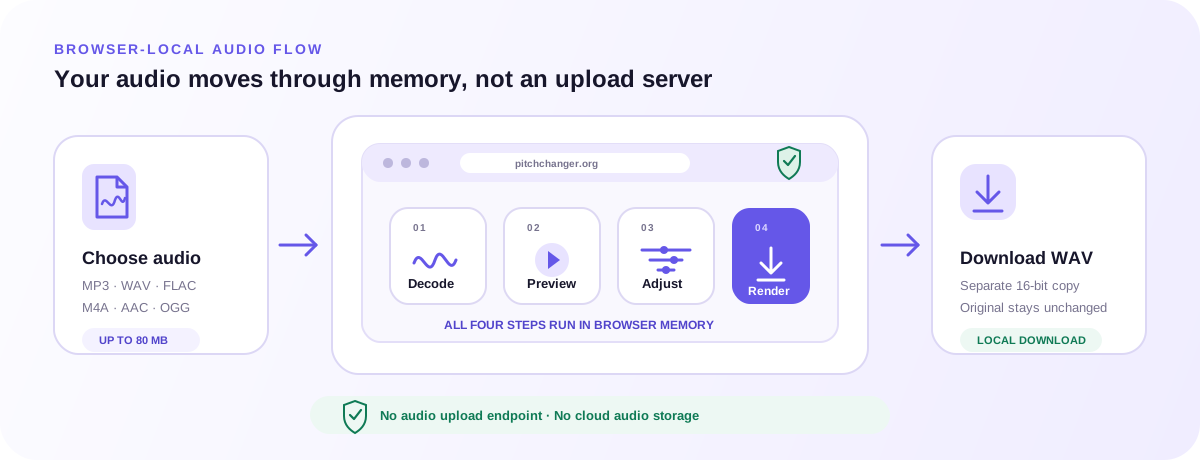
Browser-local slowed reverb generator workflow from file validation through tape-style slowdown, deterministic reverb, preview, and WAV download
The selected file, decoded audio, generated impulse response, settings, and rendered WAV stay inside this browser session.

Input and browser limits

The slowed reverb generator accepts common audio formats up to 80 MB and 10 minutes when the current browser can decode them. Duration and a 384 MiB worst-case processing budget are checked locally before expensive work begins.

16-bit WAV with a complete tail

A slowed reverb generator export contains the slowed body plus exactly one fixed tail whenever Mix is above 0%. A final 0.98 peak ceiling protects encoding from direct clipping. Compressed output formats and video backgrounds are outside this release.

Private browser-local processing

The slowed reverb generator keeps file bytes, decoded PCM, waveform, controls, impulse response, and output in this browser tab. Analytics receive coarse tool actions without filenames, exact duration, settings, audio, or downloaded bytes.

Related browser tools

Pitch, timing, direction, tone, automatic analysis, and tap-based tempo are different audio tasks. Open the tool whose controls match the result you need. Any file you choose stays inside that tool’s browser-local workflow.

FAQ

Direct answers about linked speed and pitch, reverb Mix, supported files, WAV export, browser-local processing, and the limits to check before you begin.

What does a slowed reverb generator do?

A slowed reverb generator lowers playback speed and pitch together, then blends the result with reverberation. This page offers a 70% to 100% tape-style speed range, a 0% to 60% wet Mix, local preview, and 16-bit WAV export.

Does slowing the audio also lower its pitch?

Yes. Speed and pitch are intentionally linked here. The page shows an estimated semitone change calculated from the speed ratio. Use the main Pitch Changer when you need pitch and tempo to move independently.

How long is the reverb tail?

The generated impulse response is fixed at 2.5 seconds. Any Mix above 0% includes the full tail in the WAV. At 0% Mix, the tool adds no tail and renders only the tape-style slowed body.

What is the difference between Mix and volume?

Mix sets the wet share of the processed signal. Dry gain is 1 minus Mix and wet gain equals Mix, followed by a fixed safety gain. It does not act as an independent output-volume booster.

What does Original or Processed change?

Original is a listening bypass that uses the source speed with no wet signal. Processed restores the visible speed and Mix. Switching preserves the playhead and controls; WAV export follows the processed settings.

Can I add bass boost, vinyl noise, rain, or a video background?

No. This release stays focused on linked slowdown, pitch lowering, and fixed reverb. The Online Equalizer handles frequency balance, while video and decorative audio layers require a separate editing workflow.

Which files can the slowed reverb generator open?

You can choose MP3, WAV, FLAC, M4A, AAC, or OGG up to 80 MB and 10 minutes when the browser supports that codec. Unsupported or undecodable files fail locally before processing.

Is my audio uploaded?

No audio upload route is used. Metadata checks, decoding, preview, reverb, WAV rendering, and download preparation happen in browser memory. Hosting and analytics still receive ordinary page-request and coarse interaction data described in the Privacy Policy.

Can the slowed reverb generator keep the original pitch?

No. Tape-style slowdown intentionally lowers speed and pitch together. Use Audio Speed Changer when you need a slower or faster result at the original musical pitch, or Pitch Changer when you want separate pitch and tempo controls.

Can I download MP3 or keep the source tags?

No. The slowed reverb generator exports a new 16-bit WAV. It does not recreate MP3, M4A, FLAC, AAC, or OGG compression, and it does not copy cover art, artist tags, bitrate, or other source metadata into the download.

Choose a file, compare a measured preset with the original, refine speed and Mix, then export after the body and fixed tail work together.

Make Slowed + Reverb Audio